
Simple Steps to Pick the Best Mobile Crypto Wallet for Everyday Use
How to Choose a Mobile Crypto Wallet That Fits You
Choosing a crypto wallet mobile app is not a brand-name contest. It’s more like choosing a lock for a house you plan to enter many times a day. You want the door easy to open but hard to fool. A passcode that gets in your way every morning is not much of a winner.
A crypto wallet mobile setup has to answer four plain questions: Who holds the keys? Which coins and networks do you use? What happens if you lose the phone? Can you still move the money if the app shuts down? I’ll use those questions to compare custody, security, cost, and daily use. And yes, a long coin list gets you only a short nod. It has to match what you actually plan to hold or use.
What a Mobile Crypto Wallet Actually Does
A crypto wallet usually does not hold Bitcoin, Ether, or other tokens inside the app. On a public blockchain, the tokens sit on a shared ledger. The wallet controls the keys and tools used to prove that a transaction is yours. It also gives you addresses, balances, and history so you can send, receive, buy, sell, or swap through linked services.
Core wallet jobs
- Create a wallet and receive public addresses
- Show balances and transaction history
- Receive tokens through an address or QR code
- Send tokens after signing each request
- Choose the correct blockchain network
- Show fees, confirmation status, and transaction IDs
- Connect to exchanges and decentralized apps when supported
- Import or recover a wallet with the right credentials
When you send crypto, the wallet signs a request and sends it through blockchain network computers called nodes. The nodes check the request and record it on the ledger. A normal app cannot cancel or reverse that entry after it is confirmed. That is why the send screen deserves more attention than most bank app screens do.
Once a blockchain transaction is recorded, the wallet cannot simply reverse it.
Keys and Seed Phrases Do the Real Work
A private key signs transactions and proves control of a wallet. A seed phrase, also called a recovery phrase or mnemonic, can restore that control. Common BIP-39 seed phrases contain 12 or 24 words chosen from a list of 2,048 words. The words may look random, but their order matters. Never give the phrase to a person, support agent, website, or chat window.
Self-custody is not magic. A wallet can encrypt secrets, use Keychain or Keystore, ask for a device passcode, use biometrics, and add its own password. Those steps can slow theft, but malware, a rooted phone, or a tricked user can still cause harm. The seed phrase remains the last backstop.
Recovery questions to ask
- Does the wallet use a recognized recovery standard such as BIP-39?
- Can the wallet be imported into another compatible app?
- Does the app use a wallet password that is separate from the phone passcode?
- Will I need the network or derivation details when I restore access?
- Can I keep the written backup offline and away from the phone?
- Does the app explain where the seed and private keys are stored?
Self-Custody or Provider Custody
That brings up what is a self-custodial wallet . It is a wallet where you alone control the private key. No company sits between you and the funds, and the wallet can be created without KYC documents, though services used to buy crypto may ask for identity details. If you keep the seed phrase, you can often import the wallet into another compatible app.
A custodial wallet works in the other direction. A provider stores the keys and controls access. That can make login recovery and account support easier. It also means the provider can freeze access, restrict transactions, lose funds in a hack, or fail as a business. Most exchange accounts, including those named in the source material, fall on this side.
Two custody models
- Keys: You control them in self-custody; the provider controls them in custody
- Recovery: Your seed restores a self-custody wallet; a provider may offer account recovery
- Access: No intermediary can block a self-custody balance, while a provider can limit its account
- Identity: A self-custody wallet needs no KYC, while custodial exchanges usually request documents
- Portability: A seed phrase may import a self-custody wallet; the exact exchange account may not export
- Risk: You face lost backups and stolen devices; a custodial user also faces provider failure
When people mention a Coinbase app wallet , the source treats Coinbase as a custodial example. That can make buying and account recovery simple for many users. It also means a company controls the keys tied to that account. Easy access and direct control are not the same thing.
Not your keys, not your coins.
Hot Apps, Hardware Wallets, and Paper
A mobile wallet is usually a hot wallet because it connects to the internet and signs through software. That makes it easy to use while you are away from home. It also puts keys and signing work near malware, stolen phones, bad apps, weak operating systems, and pages built to steal secrets.
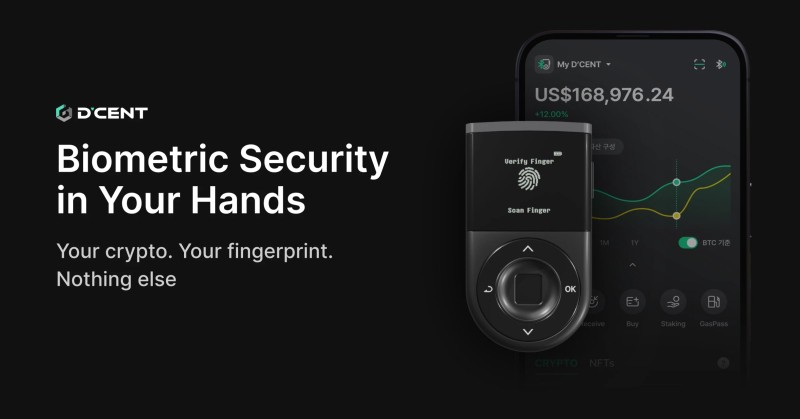
A hardware wallet keeps private keys inside a separate physical device. It often connects to a phone by USB or Bluetooth, but the owner must check the details and confirm the transaction on the hardware itself. It costs money and takes more steps. In return, keys can stay away from the internet during storage.
Where the keys live
- Mobile software: Convenient and quick, but connected to a phone and the internet
- Hardware: Offline key storage and physical confirmation, with added cost and steps
- Paper: Offline and cheap, but easy to lose, steal, damage, or expose to another person
A multisig wallet needs approval from more than one authorized signer before a transaction can go through. That can reduce reliance on one phone or one person, but setup and signing become harder. Wrong signer settings can also block access. It is a shared control system, not a magic extra password.
An HD wallet can derive many addresses from one master seed. This can reduce repeated use of a single public address and spread activity across several addresses. It does not make the activity private, and losing the master seed can still lock you out. More addresses do not replace a good backup.
Mobile Wallets and Browser Extensions
A mobile wallet is a native app on a phone. It can show balances, scan QR codes, use biometrics, and reach blockchain apps from different places. A browser extension lives inside a desktop browser and depends on that browser, its updates, and the security around it. Neither format wins just because of its shape.
Mobile and extension tradeoffs
- Mobile wallets work on iOS and Android devices with supported app versions
- Mobile users can send and receive while away from a computer
- Mobile wallets depend on one phone and its local security
- Extension wallets use a desktop or laptop and a supported browser
- Extensions often have more screen space for browser-based dApps
- Extensions face malicious sites, clipboard attacks, browser flaws, and bad extensions
A browser sandbox often keeps a website from reading extension memory directly, but browser bugs can cross that line. A mobile app may rely on Keychain or Keystore, but spyware, rooted devices, and stolen phones can cause trouble. The final result depends on the platform, code, key storage, updates, authentication, and what the user clicks.
How to Open a Crypto Wallet
If you are searching for how to open a crypto wallet , the safe process starts before money moves. Pick the custody model, check the supported networks, and make sure the app works on your exact phone. Then create the wallet inside the official app, record the recovery phrase offline, and test the receive and send flows with a small amount.
A careful setup order
- Choose self-custody or provider custody before creating the account
- Check phone model, operating system, region, coins, and networks
- Install the app through its official store or provider page
- Create a new wallet rather than accepting one offered by a stranger
- Write the seed phrase in order on a secure offline surface
- Set a device passcode, app lock, and extra wallet password if offered
- Open the receive screen and check the full address or QR code
- Make a small test and confirm it appears in transaction history
Do not store the phrase in a screenshot, cloud note, email draft, or ordinary phone gallery. Anyone who gets the words may control the wallet. Keep the backup separate from the device you use every day, and learn what information you will need to restore the wallet elsewhere.
A clean screen can hide a lot of plumbing under it. The app may make keys, connect to a node, sign data, and submit a transaction while showing you little more than a spinner. The source’s Flutter example does this with basic wallet functions, but it stores generated data in shared preferences and warns that the approach is not safe for production use.
Security Checks Before You Fund It
Security is not one shiny lock on the front door. It is a chain of small controls, and one weak link can matter. I would look at custody, storage, app access, code review, transaction checks, updates, and what the wallet does with your data. The source gives readers a long list because there is no single checkbox that proves safety.
Security checks
- Find out who controls the private keys
- Check for Keychain or Keystore, encryption, and an app lock
- Look for device passcodes, biometrics, and an optional wallet password
- Check whether source code and independent audits are available
- See whether the wallet is kept for supported device systems
- Look for transaction simulation and address, network, and fee checks
- Check analytics, crash reports, and third-party data sharing
- See whether rooted, jailbroken, or badly outdated systems get warnings
A phone can fail in boring and dramatic ways. Someone may steal it, install malware, use spyware, or trick you into entering a fake recovery site. A weak passcode and a public screen can expose secrets without any attacker breaking the wallet itself. Public blockchain addresses and transaction history can also reveal financial links even when the keys stay private.
Open-source code has two sides. It lets readers and researchers inspect what an app claims to do, but attackers can read the same code and hunt for weak spots. Code quality, update speed, dependency care, and the provider’s response to bugs matter more than the label alone. Several small design mistakes can become dangerous when they work together.
What Kraken Wallet Teaches About Phone Security
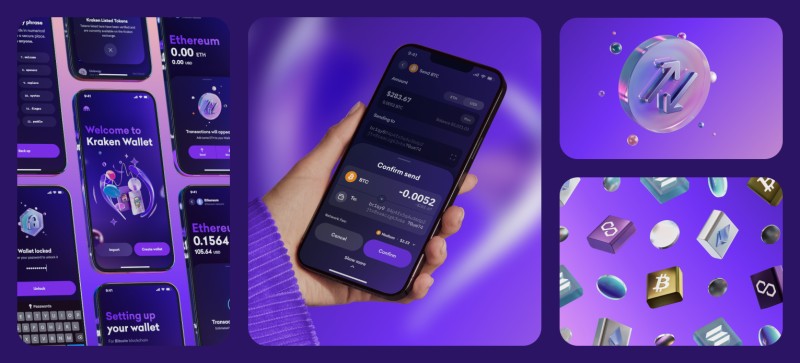
The source describes Kraken Wallet as a multichain, self-custody, open-source mobile app under the MIT license. It says keys are made on the device, while seeds and mnemonics go into Keychain or Keystore. An encrypted Realm database holds non-secret wallet data. The described design also includes app locking, optional password protection, biometrics, transaction checks, and a privacy proxy.
Controls described for Kraken Wallet
- Key generation uses a secure random source on the device
- BIP-32 and BIP-39 packages create the seed and derive keys
- Keychain and Keystore protect secrets and app-lock data
- Argon2id slows password guesses when a wallet password is enabled
- AES-GCM encrypts stored data and detects tampering
- Transaction checks flag risky requests, bad addresses, wrong networks, and high fees
- A proxy keeps the user’s IP address away from outside blockchain-data providers
- The client has no outside analytics or crash-reporting software
- Updates follow the normal App Store or Play Store path
One limit in the source is that Apple’s CryptoKit did not support the secp256k1 curve used by Bitcoin, Ethereum, and many other chains. The described app could not use the device secure element directly for those keys. Private keys had to enter app memory during signing, so the mobile wallet was still treated as hot. That does not cancel its other controls. It shows where the weak points are.
Don’t trust, verify!
The source says Trail of Bits conducted an outside audit and made a public report available. That gives researchers something real to inspect. It does not freeze the wallet in time, though. New code, changing libraries, and new attacks mean that updates and follow-up work still matter after an audit.
Coins, Chains, and Token Support
A wallet can support a coin on paper and still fail your real needs. It may show the token but not the network you use. It may list a chain but make it hard to tell which account is active. Check exact assets such as Bitcoin, Ethereum, Solana, Base, BSC, XRP, and Tether before you rely on the app. “Supports crypto” is too broad a promise.
Chain and token questions
- Is the token supported directly, or only shown through a third-party list?
- Does the wallet name the network beside every balance and token?
- Can I see several chains in one interface?
- Can the app reach dApps and WalletConnect requests?
- Does it show the fee for the selected network?
- Can it validate recipient addresses before signing?
- Does it flag unknown or low-reputation assets?
- Does it support the wallet features I need, such as NFT views?
A BEP-20 wallet app needs to support BNB Smart Chain, called BSC in the source. The token should appear with the right network, and the send screen should make that choice hard to miss. A token name by itself does not prove which network the app will use.
A multichain interface can save you from switching between several apps. It can also put more network labels in front of you at once. Read them before every signature, especially when you move between a wallet, a bridge, a swap, or a decentralized app. Convenience is nice, but the network choice still belongs to you.
Everyday Use and Active Trading
A holder who sends crypto once in a while needs a much smaller tool than an active trader. One person may want clear balances, QR codes, and safe recovery. Another may move between Solana, Base, BSC, and other networks all day while checking prices, positions, and alerts. Those are very different jobs for a phone.
Features tied to the job
- Simple balances, send, receive, and QR scanning for basic use
- Token swaps and clear network choices
- Fiat purchases where the provider supports them
- Price alerts and portfolio views
- Decentralized apps and WalletConnect
- Staking, vault, and NFT screens
- Perpetual futures and prediction markets for active traders
- Copy trading, rewards, and multichain position review
The source presents FlipX as a mobile wallet and active-trading room. It combines wallet functions with swaps, perpetual futures, prediction markets, copy trading, vaults, and portfolio tracking. That can fit a trader who values speed and one screen. It may be more than a long-term holder who rarely trades needs.
More features also mean more places where something can go wrong. Swaps, futures, copied strategies, dApps, and bridges create more requests to read and sign. The source’s risk note says crypto investments can lose all invested money, government protection may not apply, and tax duties may arise. A busy screen does not make any of those risks smaller.
App Cost, Network Fees, and Buying
A free cryptocurrency wallet app may charge nothing to download, but sending can still cost a network fee. Some wallets charge for fiat purchases, swaps, trades, or extra services. Price the whole route, not just the download button.
Costs to count
- App download or subscription cost
- Blockchain network fees for sending
- Fiat purchase fees and payment costs
- Swap or trading fees
- Optional advanced service charges
- The price of a hardware wallet for cold storage
If your question is buying crypto on cash app , do not confuse buying with choosing where keys live. An app can make buying easy while the purchased balance remains under provider custody. Check whether a withdrawal sends the funds to a self-custody address that you control.
The source only says some software wallets support card or bank purchases. It does not say every mobile wallet does. Payment methods, identity steps, and fees depend on the provider and your region. Those rules do not tell you whether the app holds your keys, so keep the two questions separate.
Mobile Wallet Apps With Different Jobs
A quick list of top crypto wallet apps can mix simple vaults, dApp wallets, and trading rooms. Those are different jobs. So I would compare each app by custody, chains, recovery, phone fit, and the work you expect to do.
Named wallet examples in the source
- MetaMask: A self-custody Ethereum wallet with mobile and browser versions, HD features, and dApp use
- Trust Wallet: A self-custody wallet described as open source, with broad coin support on mobile and browser extensions
- Kraken Wallet: A multichain, self-custody, open-source mobile app with on-device key generation and transaction checks
- ONTO Wallet: A multichain wallet for digital identity, assets, NFTs, dApps, and cross-chain swaps
- Tangem Mobile: A free self-custody wallet that creates a wallet inside its app
- 1inch Wallet: A self-custody software wallet with HD features
- FlipX: A mobile trading workspace with swaps, futures, prediction markets, copy trading, vaults, and rewards
Ledger is the hardware-wallet example, not a mobile app. It can work with a phone or computer, but it needs separate hardware and physical confirmation. Coinbase appears on the custodial side of the comparison. These names do not fill every column. One app may have broad coin support but weak recovery, while another may focus on a narrow set of dApps.
Features, fees, and region support can change, so check the provider’s own information before moving money. Confirm your phone model, operating system, exact network, recovery method, and fees. A stale comparison page cannot inspect your phone for you.
How I Build a Wallet Shortlist
If your search box is asking for the best crypto wallet for mobile , don’t expect one clean winner. I would turn any list of top crypto wallet apps into a scorecard for your own phone and habits. A feature that matters little to you should not push a weak recovery setup to the top.
A practical shortlist
- Mark whether you want self-custody or provider custody
- List every coin, token, and network you expect to use
- Check the seed standard, import path, and backup method
- Confirm support for your exact phone and operating system
- Look for audits, open code, updates, and clear key storage
- Check address, network, fee, and transaction warnings
- Add the app fee, network fee, and service costs
- Compare the daily workflow with the features you will really use
Searching for the most secure mobile wallet for cryptocurrency will turn up plenty of strong claims. Security comes from the whole setup: key control, the phone, the app, the provider, the user, and the backup. A claim without proof is just a claim.
There is no single best way to own crypto for everyone. A self-custody wallet paired with hardware for long-term storage and a smaller mobile balance for daily use is one model. A custodial exchange account is another. The right choice is the one whose control, recovery, and risk rules you understand.
Wallet Setups I Would Put on a Shortlist
I would make the call in plain stages. First choose who holds the keys, then check the exact assets and networks, then test recovery and phone security, and only then compare fees and extras. That order stops a long feature list from making a weak choice look clever.
Simple wallet profiles to compare
- Everyday holding: Use a self-custody mobile wallet with clear balances, simple recovery, biometrics or an app lock, and the exact chains you need
- DApp use: Look for WalletConnect, transaction warnings, address checks, and a clear way to spot a network or token mistake
- Active trading: Compare multichain speed, price context, portfolio views, alerts, swaps, and the risk tools for futures or prediction markets
- Long-term storage: Consider a hardware wallet for offline keys, plus a written recovery plan that does not depend on one phone
- Provider recovery: A custodial wallet may be easier for account login support, but understand freezing, KYC, hacking, and business-failure risk
- The final test: Fund a small amount, receive it, check the network, review the full address, and make sure you know how the app and recovery process work before adding more

Comments on “Simple Steps to Pick the Best Mobile Crypto Wallet for Everyday Use”
No comments yet. Be the first to share your thoughts.