
- A public address receives cryptocurrency and can be shared with other people.
- A private key signs spending requests and must never be exposed.
- A 12-to-24-word recovery phrase can restore access if the device is lost.
- A companion app builds, checks, and sends transaction requests.
Hot or Cold? How to Find the Best Cryptocurrency Cold Wallet
12 October, 2026
0 comments
Hot or Cold? How to Find the Best Cryptocurrency Cold Wallet
There is no single best cryptocurrency cold wallet for everyone. A cold wallet keeps private keys away from an always-online device, while a hardware wallet signs a transaction without spilling the key onto your phone or computer. That removes a huge pile of remote risk. It does not make you careful, and it cannot stop you from approving a transfer to a thief.
When I compare hardware wallets , I start with what stays offline, what the screen shows, and how recovery works. I then check supported assets, connection type, security history, ease of use, and price. That is also how I would search for the best cold storage device . The goal is not the biggest screen or the flashiest coin count. It is a wallet you can use without making one costly mistake.
What a Cryptocurrency Wallet Stores
A wallet does not hold a Bitcoin-shaped coin under a mattress. The coins are entries on a blockchain ledger, and the wallet controls the keys tied to those entries. Your public address is the part you share. Your private key is the part that must stay secret.
What a cryptocurrency wallet works with
A public address works much like a bank account number. A private key works much like the secret credential needed to spend. The recovery phrase is even more important because it can rebuild the wallet on another compatible device. If someone gets that phrase, they may be able to take the funds.
If you don't control the keys, you don't control the coins.
Hot, Cold, and Warm Wallets
If a friend asks what a hard wallet for crypto means , I would say it usually means a wallet that keeps key material away from the internet. People also use the odd phrase hard wallet for the same idea. Most of the time, they mean a hardware wallet, though paper and metal storage can also be cold.
Hot, cold, warm, and paper wallets
- Hot wallets keep keys on internet-connected apps, browsers, desktops, phones, or exchange accounts.
- Cold wallets keep key material offline and fit long-term holdings or larger balances.
- Warm wallets stay online but add checks such as explicit consent, extra authentication, or transaction screening.
- Paper and metal wallets keep keys offline but face loss, theft, fire, water, and other physical risks.
Hot wallets are built for speed. MetaMask, Trust Wallet, Phantom, and exchange accounts are examples named in the source. Cold wallets trade some of that speed for key isolation. A warm wallet sits in between: one source describes a system that uses a one-time password and asks for clear user consent before a transfer, but its keys still live in an online setting.
A hot wallet is convenient. A cold wallet keeps more of your money machinery out of internet reach.
Custodial and Non-Custodial Wallets
A custodial wallet keeps the private keys for you. An exchange account is the clearest example. You get access through a login, but the provider controls the keys and stands between you and the funds.
A non-custodial wallet gives you control of the keys and recovery phrase. You can restore the wallet on another compatible device if the original device is lost. That also means no support agent can rescue a bad seed phrase or reverse a blockchain payment.
Many people use both kinds. They may keep long-term coins in a self-custodied cold wallet while using a custodial or hot wallet for a small spending balance. This can work well, but separate wallet names do not help if every wallet shares the same recovery phrase.
Why Hardware Wallets Help
A hardware wallet creates or stores keys inside a small device. Your connected phone or computer can build a transaction, but the private key stays inside the wallet while the device signs. Among crypto hardware wallets , that key isolation is the main reason to use one.
Security features worth checking
- A secure-element chip designed to resist physical and logical attacks.
- EAL5+ or EAL6+ Common Criteria testing for the secure chip.
- Firmware that is open source, auditable, or backed by a clear review process.
- A known way to download and verify firmware through the maker.
- A screen that shows the destination, amount, network, and request type.
- A strong PIN, fingerprint option, scam warnings, and a clear recovery process.
Certification matters, but it does not cover the whole wallet. It cannot stop a phishing page, a tricked owner, a bad address, or a person who approves a token contract without reading it. A good cold wallet removes keys from the computer. It does not remove your need to check what the keys are signing.
Cold storage can stop a remote thief from copying the key. It cannot stop you from signing the thief's request.

Where Cold Wallets Still Fail
Hey, don't skip this part. A hardware wallet is not a magic shield. It signs whatever valid request you approve, even when the request came from malware, a fake app, or a scam site. The keys may stay safe while the owner signs a transfer that empties the wallet.
Common cold wallet failure points
- Approving a malicious transfer or token permission.
- Connecting to a computer that has malware or a fake wallet extension.
- Photographing, texting, emailing, or storing the recovery phrase online.
- Buying a used device that contains old firmware or another person's seed.
- Losing the device, recovery phrase, paper wallet, or metal backup.
- Ignoring firmware fixes or package tampering signs.
- Entering a PIN or seed where another person can see it.
This is why there is no clean answer to what the safest crypto wallet is . The device matters, but so do the computer, the app, the setup, and the person clicking approve. A well-kept cold wallet can be safer than a careless hot wallet. A badly used cold wallet can still lose everything.
A hardware wallet will sign a bad transaction just as faithfully as a good one.
What Beginners Should Compare
The best cryptocurrency cold wallet is not decided by one feature. Start with the coins and networks you hold, then compare the things that can stop you from signing or recovering them. Price comes later, because a cheap device that confuses you may end up costing more.
What to compare before buying
- Key isolation and the secure-element rating.
- Support for each exact coin, token, network, stablecoin, and NFT you may use.
- Screen size and whether it shows full transaction details.
- USB, Bluetooth, NFC, mobile, desktop, or air-gapped signing.
- PIN and fingerprint behavior, including biometric storage.
- Firmware review, update process, and security history.
- Recovery options, backup needs, and device replacement steps.
- Price, size, portability, and whether you will use the device often.
For easy setup, look for simple menus, clear prompts, and a companion app that does not bury key details. The ABI Research analysis in the source used the Trezor Model One as an example of good user experience, citing a 128-by-64-pixel OLED and setup of about 10 minutes. A color screen or fingerprint sensor may help, but neither one proves the whole wallet is safe.
Connections, Screens, and Scam Checks
The computer or phone builds the request, but the cold wallet should confirm it. That split creates room for a fake display. Malware can show one address on the online device and send a different address to the hardware wallet for signing.
Common connection methods
- USB connects the wallet to a computer for signing.
- Bluetooth or NFC supports mobile use but puts more weight on companion-app security.
- QR-code air-gapped signing keeps the wallet physically separate from the online device.
- Desktop-only setups can suit people who manage most funds from a computer.
Before signing, the wallet screen should show the full destination, amount, network, asset, and type of request. Scam checks can also compare an address with known scam lists, simulate the result, and flag risky token approvals or smart contracts. Those warnings help, but no warning catches every trick. The final check still happens on the hardware wallet's own screen.
The Beginner Device Shortlist
The source shortlist named D'CENT, Ledger, Trezor, Tangem, and SafePal. Its rough beginner price range ran from about $49 to $200, with some biometric and higher-end devices costing more. Those figures are a historical price snapshot, not a promise. Check the official product page and store when you buy.
What the source shortlist said
- D'CENT Biometric: about $139, EAL5+, 4,800-plus coins, fingerprint access, and real-time scam warnings.
- Ledger Nano X: about $149, EAL5+, 5,500-plus coins, and Bluetooth connection.
- Trezor Safe 3: about $79, EAL6+, 8,000-plus coins, and auditable firmware.
- Tangem: about $49 to $69, EAL6+, 6,000-plus coins, and a card-based design.
- SafePal S1: about $49, EAL5+, 10,000-plus coins, and an air-gapped QR workflow without Bluetooth.
The source does not fully agree with itself. One D'CENT piece listed the Ledger Nano X as EAL5+ with 5,500-plus coins, while another called it EAL6+ with more than 15,000 assets. The shortlist covered the Trezor Safe 3, while a second comparison covered the Safe 5. D'CENT appeared at $109, $139, and $159 in different source captures.
That does not make the products fake. It means model names, catalogs, sales, and price pages can differ. Compare the exact wallet in your hand, not a brand name or an old headline. The best cryptocurrency cold wallet is the one whose exact model fits your assets, connection, and security habits.
Check the exact model, exact firmware, and exact store page. A brand name is not a spec sheet.
D'CENT and Biometric Wallets
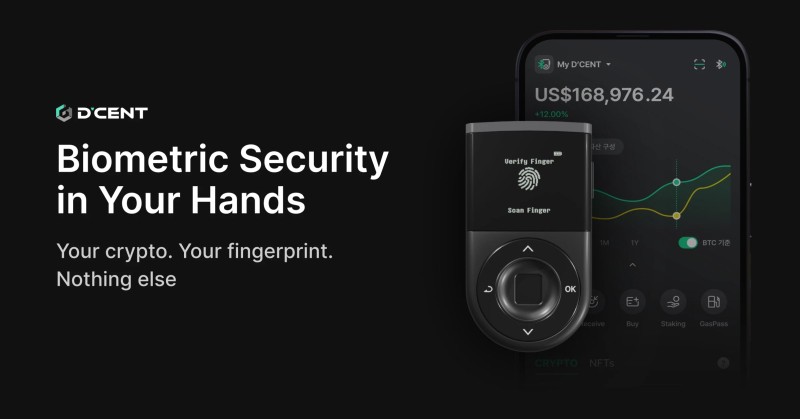
D'CENT's materials focus on fingerprint access, mobile use, and transaction checks. The Biometric model includes an OLED, Bluetooth and USB, a secure element, and a mobile app. D'CENT says fingerprint data stays on the device. The stated benefits are faster access, fewer public PIN entries, and support for as many as two fingerprints with PIN fallback.
Its Blockaid integration is meant to inspect a request before signing. The source says it can compare scam databases, simulate outcomes, flag token approvals, and warn about malicious contracts. Those are warning tools, not proof that a request is safe. You still need to read the wallet screen.
The source gives conflicting setup accounts for D'CENT. One says a fingerprint can remove PIN entry for every transaction, while another says some actions need both a PIN and fingerprint. D'CENT also reported no hacks or security breaches from its 2018 launch through the period covered by its own material. That last point is a maker claim, so check the security record and exact firmware before relying on it.
Ledger and Trezor Compared
The Trezor vs Ledger wallet choice comes down to the model and the way you use it. The source presents Trezor as the open-source-focused option, especially for desktop users. It describes the Safe 5 as having a color touchscreen and haptic controls. Ledger is presented as a broad catalog with a large support base, and the Nano X as a Bluetooth model for mobile use.
If you are choosing the best Trezor cold wallet for your setup, compare the exact model instead of relying on the Trezor name. The Safe 3 and Safe 5 have different screens and controls. One D'CENT comparison described the Safe 5's iOS app as limited, while the Ledger figures and certifications also differed between source pieces.
Open firmware can let people inspect more of the code. A wide asset list can help someone who holds many networks. Neither feature checks a scam address for you, and both brands need careful recovery handling. The best pick is the exact model whose screen, software, and supported assets match how you plan to use it.
Open code and long coin lists are useful. They are not substitutes for reading the transaction on the device.
Tangem and SafePal
Tangem uses a card-based design. The source lists EAL6+ certification, more than 6,000 supported coins, and a rough price of $49 to $69. Tangem describes itself as non-custodial and says it does not hold user assets, but some transaction services come from third parties. That means the card, app, and outside service each deserve attention.
The SafePal S1 takes a different route. It uses a camera and QR codes to move transaction data between an online device and an air-gapped signing device, so the private key never needs to sit on the connected computer. The source lists EAL5+, more than 10,000 coins, no Bluetooth, and a rough price of $49. Air-gapped does not mean mistake-free; the offline screen still has to be checked.
Paper and Metal Wallets
A paper wallet keeps keys offline in a very literal way. It avoids an always-connected device, but it puts your backup in a pile of material that can be misplaced, soaked, burned, chewed, photographed, or noticed by another person. Metal can help with some physical damage, but it does not fix an exposed seed or a bad signature.
Physical risks of paper and metal wallets
- The wallet or recovery words may be lost or thrown away.
- Fire, water, flood, animals, or children can destroy the backup.
- Another person may see or photograph the keys.
- Spending usually requires moving the assets into a software or hardware wallet first.
- There may be no device screen for checking the final transaction.
A paper wallet is not useless, but it is not hands-off storage either. It needs a protected place and a sound recovery plan. A hardware wallet gives you a screen and signing controls, which is why many beginners use one for daily access and keep a careful offline recovery backup.
Setting Up Your First Cold Wallet
Buy the device from the maker's official site, verified store, authorized retailer, or an authorized marketplace such as Amazon. A used device can carry old firmware, malware, or a recovery phrase made by the prior owner. Check the package before power is on. If a seal looks broken or the box was resealed, stop and contact the maker.
First cold wallet setup
- Buy from an official or authorized source and avoid used devices.
- Inspect the package, seals, device, and included parts.
- Initialize the device and let it generate its own recovery phrase.
- Write the 12-to-24 words on paper or another offline medium.
- Check the words and their order when the device asks.
- Set a strong PIN or register a fingerprint.
- Install the official companion app and check its publisher.
- Make a small test transfer before moving a larger balance.
Do not photograph the recovery phrase, save it in cloud notes, or put it in an online document or internet-connected password manager. A screenshot is not a safe backup; it is the master key in a photo. For many holders, a hardware wallet is a safer long-term storage route , but only when the seed phrase and device are handled with care.
No real wallet support agent, website, or app will ask for your recovery phrase. That request is theft.
Checking Every Signature
The scary part of a cold wallet is not always a hacker breaking the secure chip. Often it is an ordinary click at the wrong moment. A malware-filled computer can swap the address on its screen, and a scam app can ask for a token approval that looks like a harmless click. The hardware display is the last clean checkpoint.
Check these details on the cold wallet screen
- The full recipient address, not just the first and last characters.
- The amount and asset being sent or swapped.
- The network, such as Ethereum or Bitcoin.
- The transaction type and any contract permission.
- Whether the request came from a process you started yourself.
- Whether the address and amount match your intended action.
- Whether a warning or unfamiliar token request is being ignored.
If the computer screen and hardware screen disagree, stop. Do not approve the request because the app says the warning is minor. Real-time scam detection can flag known risks and simulate outcomes, but it does not replace manual review. Check the device, not just the phone.
The connected computer can build the request. The cold wallet screen should decide what you trust.
Recovery and Security Checks
Losing a hardware wallet does not always mean losing the cryptocurrency. If the recovery phrase survives, you can buy a compatible replacement and restore the wallet. If both the device and every usable backup are gone, the funds may be out of reach. No bank or support agent can create a new private key from thin air.
A safer recovery plan
- Keep the recovery phrase offline and away from cameras, clouds, chats, and online forms.
- Plan for fire, water, theft, accidents, and being unable to read the words.
- Check that the backup still matches the wallet before you need it.
- Know which compatible device can restore the wallet.
- Share access with a trusted person only as much as needed and with privacy in mind.
A small routine catches trouble before it becomes a disaster. Each month, review wallet activity, remove unneeded token permissions with a tool such as Revoke.cash, disconnect sites that no longer need access, and look at the physical recovery backup. Every three months, check the PIN, lock, fingerprint settings, and connection after important computer or app changes.
Every six to twelve months, rehearse the recovery plan without typing the phrase into a site. Make sure the words are readable, the backup has not been exposed, and the trusted person or place you rely on still makes sense. Install firmware only through the maker's process, and never give support staff your seed.
Layered Wallets and Small Balances
The source offers $100 and $500 as rough guideposts, not universal rules. A carefully secured hot wallet may make sense for a small balance or frequent spending. A crypto cold wallet becomes more useful when the balance is larger, the money is meant to stay for years, or you do not want an exchange holding the keys.
A layered setup can keep a small amount in a hot wallet for daily use while long-term assets sit in cold storage. Separate wallets can also divide networks, accounts, or purposes. The main rule is simple: a hot wallet is convenient, but the amount exposed to its online device should be limited.
Do not confuse labels with separation. Two apps on the same phone are not two clean security rooms if they share one seed phrase or one infected computer. Different holdings need different key control when the point is to limit the damage from one failure.
Which Cold Wallet Fits You?
I would choose from the job the wallet needs to do, not from a single winner. A desktop user who values open firmware may prefer Trezor. A buyer who needs many supported assets and Bluetooth may look at Ledger. A mobile user who wants fingerprint access may consider D'CENT, while a card user may look at Tangem. If physical separation matters most, the SafePal S1 shows the air-gapped route.
Cold wallet profiles to compare
- Trezor models fit buyers who care about open firmware, desktop use, and physical controls.
- Ledger models fit buyers who want a broad asset catalog and mobile options.
- D'CENT models fit buyers who want fingerprint access and pre-signature scam warnings.
- Tangem fits buyers who prefer a card-based non-custodial design.
- SafePal fits buyers who want QR-code signing with a device kept apart from the online computer.
Before buying, write down every coin and network you hold, the phone or computer you will use, the amount you need to protect, and where the offline backup will live. Check the exact model's supported-asset list, security history, screen, firmware, recovery steps, and official price. Then buy from an authorized source, make a small test transfer, and learn to read the device screen before the balance gets serious.
Comments on “Hot or Cold? How to Find the Best Cryptocurrency Cold Wallet”
No comments yet. Be the first to share your thoughts.