
- Software wallet: installed on a computer, helps secure private keys (Electrum, Exodus, Jaxx)
- Online wallet: cloud-based, often tied to an exchange, open from any device with a password
- Mobile wallet: app on your phone, good for quick payments or trading on the go
- Hardware wallet: small device, mostly offline, hard to hack, easy to lose
- Paper wallet: paper with printed keys, good for long storage and gifting if kept safe
This Is How To Pick The Best Crypto Wallet For Mobile Without Losing Your Mind
27 September, 2026
0 comments

Best Crypto Wallet For Mobile: A Guide For Normal Humans
Trying to find the best crypto wallet for mobile can make your head spin. Yeah, join the club. I'm barely a tech apprentice myself, so I get the urge to just throw the phone in a river. The good news is you don't need to be a wizard to pick something safe and usable.
We'll go over hot and cold storage, beginner setups, trader tools, and paying for stuff day to day. The point is to help you stay safe and actually use the thing instead of letting it rot on your home screen.
Hot Wallets And Cold Wallets
A hot wallet and cold wallet are the two big buckets you hear about. Hot wallets stay connected to the internet. They're good for trading a lot and buying coffee or whatever with crypto. Cold wallets keep your keys fully offline, which makes them harder to hack.
Software wallets like Trust Wallet, MetaMask, Coinbase Wallet, and Guarda are hot. They need careful habits so you don't lose your private key. Hardware wallets like Tangem, Ledger, and Trezor store keys on a physical device that never touches the net. That's the max safety for long-term holdings.
Types of wallets you might see
Who Holds The Keys
Custody is a fancy word for who controls your private keys. In a custodial setup, the platform holds the keys and you never see a seed phrase. That triggers licensing in most places and gives the simplest UX, with account recovery by email or support.
Non-custodial means you hold the keys, often in device storage or a secure chip. The platform never touches them. You back up your seed phrase and own the risk, but no company can freeze your funds. Hybrid uses key sharding or MPC so both sides hold part of the key.
Private key is everything: never share, never store in email or cloud, never enter on websites claiming to verify.
Beginner Friendly Mobile Wallets
For new folks, the easy crypto wallets are the ones that remove friction. You want big buttons, no jargon, and the ability to send or receive in under a minute. Bonus if it handles BTC, ETH, and stablecoins without a fuss.
CoinRabbit is a hybrid wallet that mixes storage, swaps, and loans with no credit checks. No seed phrase needed, which cuts setup risk. It supports BTC, ETH, USDT, and 300+ others, but it's not built for active trading or DeFi.
Zengo drops the seed phrase entirely and uses MPC to keep keys safe. Smooth onboarding, biometric lock, and live chat. The downside is fewer chains and high in-app swap fees. Trust Wallet is mobile-first, non-custodial, and supports thousands of tokens across many chains.
Beginner picks from the source
- CoinRabbit: no seed phrase, loans and swaps in one place
- Zengo: MPC security, no private key to memorize
- Trust Wallet: clean UI, NFT support, in-app DEX
- Coinbase Wallet: self-custody, sub-wallets, Ledger link
Top Crypto Wallet Apps For Daily Use
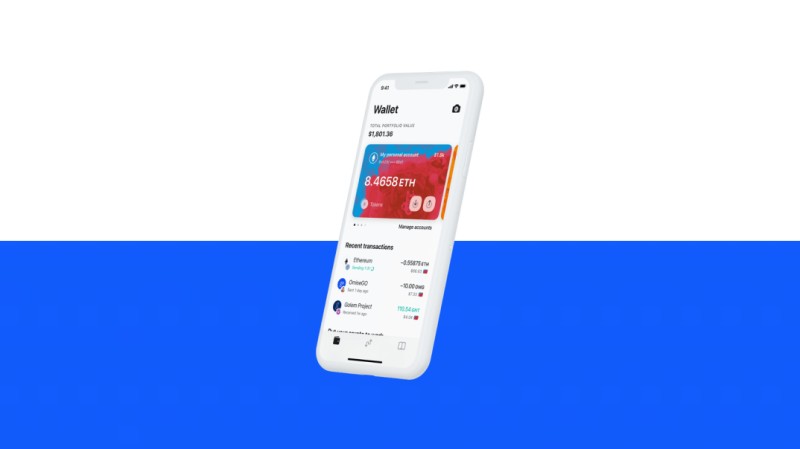
When you just want a best wallet application for everyday stuff, look at reach and support. Trust Wallet leads with a huge download count and broad market share. It handles many blockchains and over a billion a month in swaps.
Coinbase Wallet serves millions of monthly users and links with the Coinbase exchange crowd. Guarda supports a wild number of tokens across 70+ chains and lets you switch devices a lot. MetaMask is the go-to for Ethereum and DeFi even if it skipped Bitcoin and Solana early on.
Trust Wallet Security Scanner blocked $162 million worth of harmful transactions in a single year.
Best Digital Crypto Wallet For Safety
If safety is your main worry, the best digital crypto wallet is often a cold one with a screen. Tangem cards use a secure chip and tap-to-sign. Ledger Nano Flex supports 5,500+ assets with an E Ink screen and NFC.
Trezor Model One is the entry pick for cold storage without a fortune. D'CENT Biometric is the only one under $150 with a fingerprint reader and full mobile app. For big holdings, hardware beats software every time.
Cold wallets with mobile tie-in
- D'CENT Biometric: fingerprint, iOS and Android app, no breach since 2018
- Ledger Nano X: 15,000+ assets, Bluetooth, known brand
- Trezor Safe 5: open-source firmware, color screen, mostly desktop
- Tangem: card shape, NFC tap, optional seed, Visa pay link
Most Secure Mobile Wallet For Cryptocurrency
People ask me for the most secure mobile wallet for cryptocurrency and the honest answer is: it depends on use. For storage, a hardware wallet with mobile view wins. For daily spend, a non-custodial app with biometrics and a seed backup is solid.
Tangem Pay lets you spend from a cold wallet using Apple Pay or Google Pay through Visa. That's a rare mix of cold security and hot convenience. Just don't keep your life savings on a hot app, no matter how slick.
Good Cryptocurrency Apps For Trading
Active traders need speed, not just storage. The good cryptocurrency apps for this crowd act like a mobile trading desk. FlipX is built for swaps, perps, prediction markets, and copy trading in one place.
You want fast token swaps, multi-chain balances, price pages, and alerts. Opportunities jump across Solana, Base, and BSC, so app switching wastes time. A trader wallet shows your position and trade confirmations without a maze.
Trader wallet checklist
- Swap execution: quick token movement
- Multi-chain support: Solana, Base, BSC
- Price pages: market context before action
- Perps: long and short exposure
- Prediction markets: event-driven access
- Copy trading: follow trader strategies
- Vaults: compare yield products
- Rewards: cashback or XP for activity
Free Cryptocurrency Wallet App Options
A free cryptocurrency wallet app is easy to find, but free doesn't mean safe by default. Trust Wallet, MetaMask, and Coinbase Wallet are free to install and non-custodial. Guarda and Phantom are free too, with wide token support.
The catch is network fees and sometimes in-app swap spreads. Compare rates before you move funds. Swapzone is a no-KYC spot that pulls prices from many exchanges so you can pick a fair one without signing up.
User Mike said: I really liked that everything is in one place here, and you can choose from familiar names and compare prices between them.
Bep20 Wallet App And Token Support
If you play with BNB Chain tokens, you need a bep20 wallet app that speaks the right format. Guarda supports BEP-2 and BEP-20. Trust Wallet and MetaMask both handle BNB Chain after setup.
Many mobile wallets now support multiple chains, so you're not stuck. Just check the list before you send, because sending to the wrong chain can lose the funds. Test with a small amount first, always.
Top Crypto Wallet Apps For Embedded Use
Some fintech apps skip a separate wallet and bake crypto into the same login. The top crypto wallet apps in this style live inside a neobank or payment app. You tap a Crypto tab and see Bitcoin next to your checking balance.
Embedded wallets reuse KYC, login, and compliance from the fintech side. Standalone wallets are separate apps with their own onboarding. Pick embedded when crypto is a feature, not your whole identity.
Embedded vs standalone
- Embedded: same auth as fiat app, unified balance view
- Standalone: independent app, crypto-native UI
- Embedded: reuse KYC and fraud tools
- Standalone: separate compliance and onboarding
Common Pitfalls Beginners Can Avoid
Don't treat a wallet like a bank account. There's no hotline if you lose your password. Review recovery options and test them before you load up. Skipping 2FA or biometrics is just asking for trouble.
Jumping into risky tokens or random DeFi sites is how people get drained. Stick to major coins until you get the blockchain. And check swap rates, because in-app spreads can bite.
Overusing in-app swaps without checking rates: compare spreads and fees.
What To Do After Setup
Send a test transaction of around $10 to learn the feel. Bookmark official pages so phishing sites don't fool you. A simple rule: never store more than $100 on a hot wallet until you're ready.
Read one post a week from your wallet provider. It sounds small but keeps you sharp. The habits matter more than the brand on the icon.
First week habits
- Test send small amount
- Bookmark real site
- Turn on biometric lock
- Set hot wallet limit
Paying With Crypto On Mobile
Daily payments are where mobile wallets shine. Tangem Pay lets cold storage spend through Visa on Apple Pay and Google Pay. Busha app gives quick pay and trade on the go in places like Nigeria.
MEW Mobile makes Base chain easy for buys, bridges, and dApps from your phone. You need ETH for gas on Base, but fees stay low. The point is crypto you can actually use at a corner shop, not just hodl.
Cold Wallets With Mobile Integration
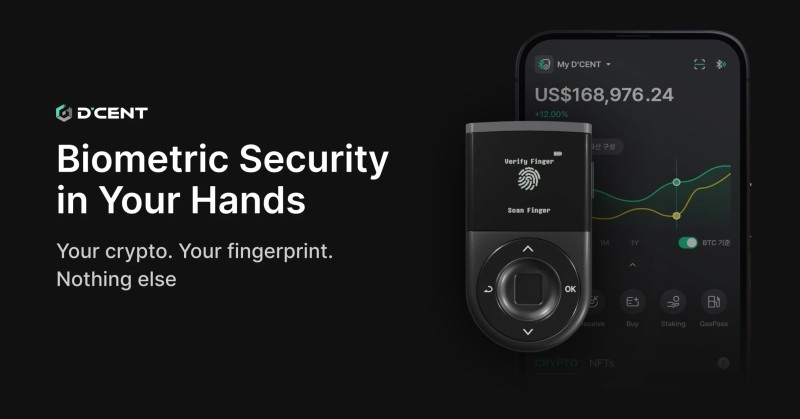
For cold storage that still works with your phone, D'CENT, Ledger, and Trezor are the names. D'CENT Biometric is the only one with fingerprint auth under $150 and full iOS and Android apps.
Ledger Nano X gives the biggest asset list and Bluetooth. Trezor Safe 5 is for open-source fans with a color screen. All three beat a hot wallet for long-term safety, but you trade some speed.
Compare cold picks
- D'CENT: fingerprint, $139, 4,500+ assets
- Ledger Nano X: $149, 15,000+ assets, Bluetooth
- Trezor Safe 5: $129, 9,000+ assets, limited iOS
Security And Safe Usage
Back up your seed phrase on paper in two spots, never a photo. For Tangem, backup cards kill the seed risk. Watch fake sites and bad extensions. Trust and MetaMask both ship scanners to block nasty transactions.
Use hardware for large holdings and software for active trades. That hot plus cold split is the calm way to sleep at night. Platforms like Swapzone with no KYC cut the surface attackers can hit.
Non-custodial wallets mean only user controls keys; no company can freeze funds.
Other Mobile Wallet Options
Phantom started on Solana and now covers Ethereum and Bitcoin too. Exodus has a clean design and built-in exchange. Bitget Wallet is a rising Web3 pick with trading features. Busha gives desktop and mobile for quick pay.
Every wallet named here works with Swapzone for rate comparison. The best fit is the one you'll open often and guard well. Don't pick by logo alone, pick by how you'll use it.
Honorable mentions
- Phantom: Solana strong, now multi-chain
- Exodus: 260+ assets, pretty UI
- Bitget Wallet: Web3 with trading
- Busha: mobile pay in Nigeria and more
Related posts

Comments on “This Is How To Pick The Best Crypto Wallet For Mobile Without Losing Your Mind”
No comments yet. Be the first to share your thoughts.